
Penwise for Apple Watch and Wear OS
Your next dose, your streak and your pills on your wrist, and the shot logged from there. Both watch apps are included at no extra cost and talk to your phone only.
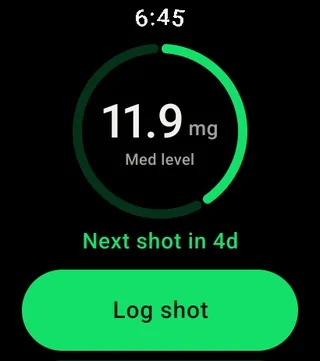
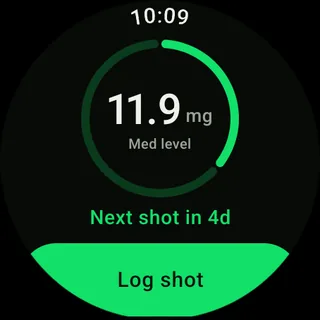
What the watch shows
-
Your next dose
A countdown to the next shot, a ring that fills from your last shot to the next one, and the medication and dose from your plan.
-
Your streak
How many shots in a row you took on time.
-
Estimated medication level
The estimated amount in your body now, the same figure as on the phone. It is a Penwise+ figure; without Penwise+ the watch says so instead of showing a dash.
-
Your pills
A row on the home screen, for example "Pills · 2 of 4 taken", that opens today's list. It is free and appears once you have added a pill or supplement in the app.
What you can do from your wrist
-
Log a shot
One tap logs the shot with the dose from your plan. Pick the injection site from the list Penwise suggests, with the site next in your rotation at the top. The phone saves it and sends you a notice that it did, or tells you why it did not.
-
Measure your resting heart rate after a shot
The watch takes a live reading and the phone saves it as your resting heart rate, on that day's shot and in the calendar and the Body screen. A reading you already have for the day is never overwritten.
-
Mark a pill taken or skipped
Open doses come first, each with Taken and Skip. The answer is written on the phone in the background, even when Penwise is closed.
-
Log a craving or your weight
Two taps for a craving: which one, then how strong. A weigh-in is a stepper. Both are Penwise+ and are not shown on a watch without it.
Out of range, nothing is lost
A shot logged while the phone is out of Bluetooth range, on a walk or with the phone charging in another room, is kept on the watch and reaches the phone when they meet again. Penwise will not backdate an action older than 12 hours, because by then the dose has been logged or deliberately skipped, and it will not log a second shot within six hours of one already logged.
On the watch face
Complications show the countdown and the level at a glance, and they say how old their figures are. If the phone has not refreshed the watch for a whole dose cycle, the watch asks you to open Penwise instead of showing old figures as current.
-
Apple Watch
Complications in four accessory families.
-
Wear OS
A ring, short text and long text complication, and a tile.
Looks like your app
The watch follows the colour, the light or dark look and the language you chose on your phone.
Which watches work
-
Apple Watch
Paired with your iPhone. The watch app installs from the iPhone; in Settings, then Watch, Penwise shows whether the watch is paired, installed and reachable, and opens the Watch app for you.
-
Wear OS 3 or later
Galaxy Watch 4 and newer, Pixel Watch, TicWatch, Fossil, Mobvoi and other Wear OS watches. In Settings, then Watch, Send it to my watch installs the app.
-
Not supported
Garmin, Fitbit, Amazfit, Huawei and other bands that do not run Apple Watch or Wear OS. Their data can still reach Penwise through Apple Health or Health Connect.
Privacy
The watch exchanges figures with your phone and with nothing else. Penwise has no server for your health records, and there is no account on the watch either.
What is free
The watch apps are free. The next dose, the streak, logging a shot, the resting heart rate and the pills list work for everyone, with no time limit. The estimated level, cravings and weigh-ins need Penwise+, which is included for your first 14 days.
Watch questions
Do the watch apps cost extra?
Can I log a shot with the phone out of range?
Does the watch send my data anywhere?
Which watches does Penwise support?
Put Penwise on your wrist.
Occasional updates, nothing else.
New features, what we are working on, and the odd thing we learn about GLP-1 tracking. A few times a year at most.
We only use your address for this newsletter. Unsubscribe from any email. Your health data is never involved: it stays on your phone.